
Invitation Maker & Card Design
Maxlabs Graphic Design ToolsArt & Design
3.8266.00 Reviews
- Version
- 2.3.7
- Installs
- 10.00M
- Age Rating
- Everyone
Screenshots
Our Review of Invitation Maker & Card Design
 Analysis by Appyee
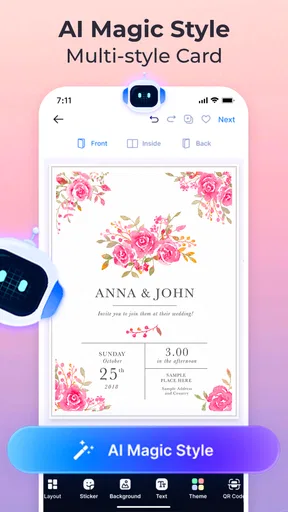
When I need an invitation that feels considered but don’t want to build a design from a blank page, a template-based card maker is often the practical middle ground. Invitation Maker & Card Design focuses on that job: it is an art and design app from Maxlabs Graphic Design Tools for making invitations, with templates aimed at occasions such as weddings, birthdays, and RSVP events. I see its main appeal as getting a usable design started quickly, then giving it enough personal detail to feel like it belongs to the event.
That focus makes it easier to judge than a broad graphics suite. I wouldn’t reach for it to create a full brand identity or carefully typeset a large print project. I would consider it when I need an invitation with a clear purpose, a short message, and a visual style that can be adapted without having to learn a professional design program first.
From template to invitation that feels personal
The app is free to download and is rated for Everyone. It has a 4.2 average from around 21,000 ratings, and more than 10 million installs, so it has clearly found an audience among people looking for a straightforward invitation-making tool. It was released on July 26, 2023, and version 2.0.5 requires Android 6.0 or later. Those details matter most if you are checking whether it will run on an older Android device; the core question, though, is whether its template-first approach suits the way you like to work.
What I like about starting with a template is that it solves the hardest early decision: where everything should go. Instead of staring at a blank canvas and trying to balance a headline, date, and decorative elements, I can begin with an arrangement that already has a visual hierarchy. That is especially useful for invitations, where the most important information should be easy to spot even when someone glances at the card on a phone.
The trade-off is that a template gives you a direction, not a finished design that automatically fits every event. A formal wedding, a child’s birthday, and a casual dinner need different tones. I’d treat the first design as a starting point and check whether its overall mood matches the occasion before spending time polishing small details. A layout can be attractive on its own and still feel wrong for the people receiving it.
What customization changes in practice
The original appeal of a template is speed, but customization is what stops the result from feeling generic. In my experience, it helps to make the event details the priority: settle on the wording, date, and location first, then adjust the visual choices around them. Changing colors or fonts before the copy is final can mean repeating the same work later, particularly if the text needs another line or a longer name.
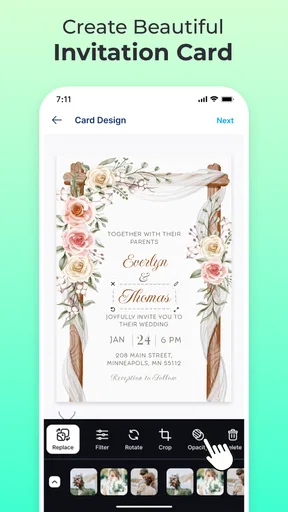
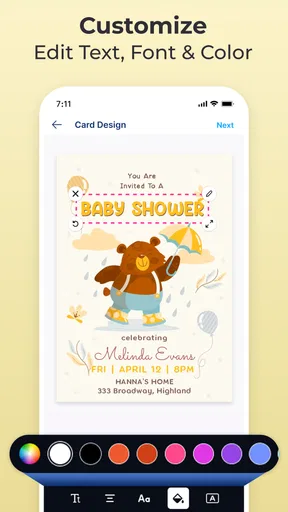
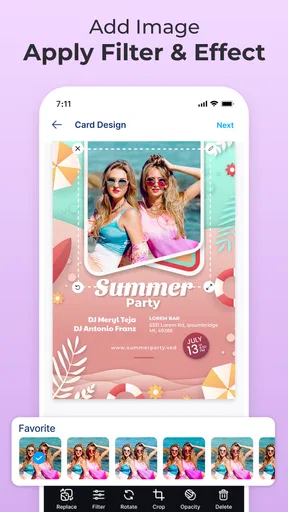
The app’s editing approach includes changing colors and fonts, adding your own images, and moving elements with drag and drop. Those controls are useful for a targeted edit: for example, replacing a picture with one that has personal meaning, or moving a decorative element away from the time and address. The important judgment call is restraint. If every element gets a different treatment, the invitation may become harder to read rather than more personal.
I’d also review the design at the size it is likely to be seen. A title that looks clear while editing can lose importance once the card is viewed as a small image in a message thread. Keeping the event name and essential details visually distinct is more valuable than squeezing in extra decoration. This is a simple check, but it helps avoid the common template mistake of prioritizing ornament over information.
A practical workflow for a real event
Imagine I’m organizing a birthday gathering after work and need to send details to friends that evening. I would first choose a template with a tone that fits the group, then enter only the information guests need to act: what the event is, when it starts, and where to go. Next, I’d adjust the color palette and type so the key details stand out, and use a personal image only if it adds something rather than competing with the text.
Before sharing, I’d read the card as a guest rather than as its designer. Is the date easy to find? Is the location understandable? Does the invitation still make sense if the recipient sees it without any extra explanation from me? That last check is particularly useful for RSVP invitations: a polished card is not enough if the person receiving it is unsure what response is expected. Clear wording can do more for a successful invite than another decorative accent.
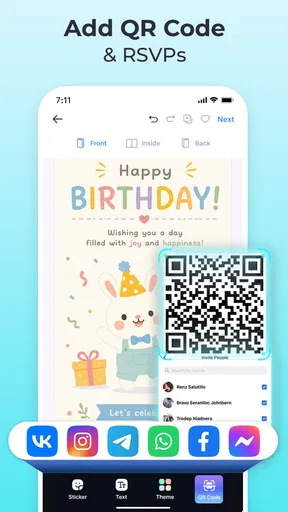
Once it is ready, the app’s described sharing options include sending by email or social media, and printing. I’d choose based on the audience rather than assuming one format works for everyone. A digital version is convenient for a group that already communicates online, while printed cards may make more sense when the invitation itself is part of the occasion. For print, I would inspect the design carefully before committing, especially the contrast and the placement of small text.
It also offers a way to make postcards, which gives the same design-minded workflow a use beyond an event announcement. I can see that being handy for a personal note or a simple follow-up after a gathering. Still, I would keep the purpose of the card clear: an invitation needs practical details, while a postcard can put more emphasis on the image and message. Reusing a layout is convenient, but the text hierarchy should change with the job.
Where it fits among design alternatives
Compared with a general-purpose graphic design app, Invitation Maker & Card Design is more appealing when the project begins with an invitation rather than an open-ended design brief. A broad design tool may offer more flexibility for someone who wants to build a layout from scratch, work across many kinds of graphics, or maintain a consistent visual system for a business. The focused template route is easier for a one-off event, but it may feel limiting if you want precise control over every part of the composition.
Compared with a basic photo editor, the advantage here is the invitation-oriented starting point: you are not just decorating an image, you are arranging an announcement with information people need. A photo editor may be a better choice if the picture itself is the project and the text is secondary. For an invitation that needs both a clear message and a designed frame, templates can save time, provided you are willing to check the result rather than accepting the first layout unchanged.
That is the distinction I’d keep in mind before downloading it. If I make invitations occasionally and want help with layout, a dedicated maker is a sensible fit. If I regularly create polished marketing materials, need highly exact typography, or want to produce a family of designs with strict consistency, I’d lean toward a fuller design tool. The best option depends less on which has the longest feature list and more on whether the app’s starting point matches the work I actually need to do.
Limits, costs, and the right expectations
The app is free, but it includes in-app purchases ranging from $2.99 to $39.99 per item. That means I would try the free experience against a real project before paying for anything. If the available template and editing options already cover the event, there may be no reason to spend. If I find myself making invitations often and repeatedly wanting options beyond what I can use without a purchase, then it may be worth weighing the paid choices against how frequently I will use them.
One limitation of any template-led workflow is the risk of looking too familiar. A design can be neat and still resemble something other guests have seen. The most effective way around that is not to change every setting, but to make a few deliberate choices tied to the event: a meaningful image, a suitable color, and copy that sounds like the host. Those edits add identity without turning a quick invitation into a long design project.
There is also a practical limit to how much information a card should carry. If an event needs detailed directions, multiple schedules, or lengthy instructions, cramming everything into the invitation can make it difficult to read. I’d keep the card focused on the essentials and send extra information separately when needed. That is not a weakness unique to this app; it is a design constraint worth remembering whenever a small card has to do too many jobs.
The app’s current version is 2.0.5. I would still approach any design app as a tool whose exact editing experience can evolve over time, so I’d spend a few minutes trying a simple draft before planning a complicated project around it. That first test also helps answer practical questions: whether the available templates suit your event, whether editing feels comfortable on your device, and whether the final design is easy for your guests to read.
Who benefits most from this approach
I’d recommend it most to people who need an attractive invitation without wanting to learn a full design workflow: a parent planning a birthday, a couple preparing a simple wedding announcement, or a host putting together an RSVP card for a small gathering. It can also suit someone who enjoys making a few visual choices but wants the layout work largely handled by a template. The app’s Everyone age rating makes it broadly accessible, though the person creating the card still needs to make thoughtful choices about its content and audience.
I’d skip it if my goal were advanced layout control, highly bespoke print design, or a complete set of coordinated materials that must follow exact brand rules. I’d also look elsewhere if I prefer designing from a blank canvas or if I need a specialist tool for a different kind of creative work. The invitation focus is a benefit when it aligns with the task; it is not a substitute for every design app.
For someone deciding whether to try it, I’d make one low-stakes invitation first. Choose an occasion, add the essential details, and see whether the template can be adjusted enough to feel personal. That quick test reveals more than browsing options in the abstract: it shows whether the editing style fits you and whether the result communicates clearly. If it does, the app can make recurring small events easier to prepare without turning every card into a design lesson.
Getting Started with Ease
The first thing I noticed about Invitation Maker & Card Design is how user-friendly it is. From the moment you open the app, you're greeted with an intuitive interface that makes navigation a breeze. You don’t need to be a graphic designer to whip up something that looks like you hired a pro.
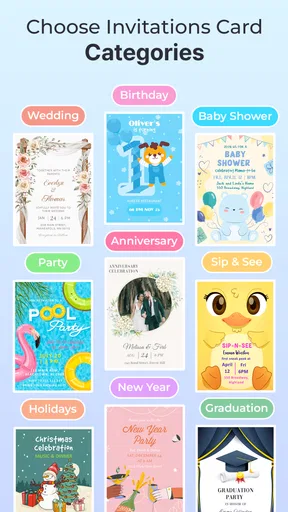
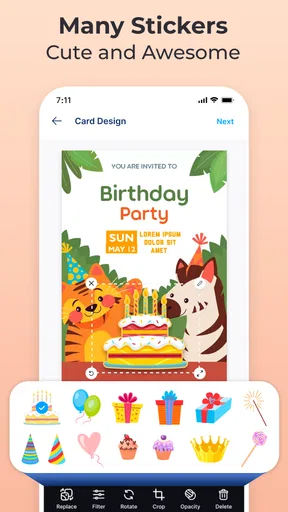
After a quick sign-up process, I was ready to dive in. The app offers a wide variety of templates for every occasion you can think of—birthdays, weddings, baby showers, and even corporate events. The templates are beautifully crafted and customizable, allowing you to add your personal touch.
Customization: The Heart of the App
Customization is where this app truly shines. Once you pick a template, you can change colors, fonts, and even upload your own images. The drag-and-drop feature is incredibly convenient, making the whole process smooth and enjoyable. You can adjust text sizes, move elements around, and really make the invitation your own.
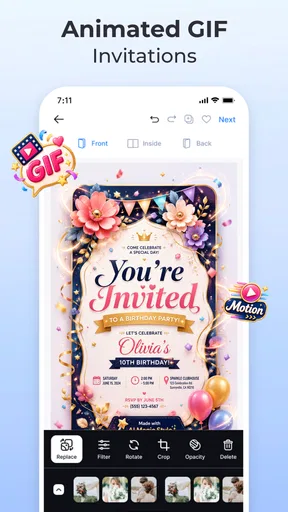
One feature I loved was the ability to add music to your digital invitations. Imagine sending out invites that play your favorite tune when opened. It’s these little touches that make your invitation stand out.
Sharing Made Simple
Once you've created your masterpiece, sharing it is as simple as a few taps. The app allows you to send invitations via email, social media, or even print them out if you're old school like me. The quality of printed invitations is impressive, with sharp images and vibrant colors that look professional.
And for those who prefer a touch of nostalgia, you can even use the app to design postcards. I found this feature particularly charming and a great way to keep in touch with loved ones.
Additional Features Worth Mentioning
Beyond invitations, the app also provides tools for creating thank you cards, flyers, and even posters. It’s a versatile tool that caters to all your graphic needs. I also appreciated the app's integration with cloud storage services, which means you can save your designs and access them across different devices.
The app also offers a premium version, which unlocks more templates and additional features. While the free version is certainly robust, the premium offers good value for anyone who frequently finds themselves in need of a design tool.
Final Thoughts
In a world where first impressions are everything, Invitation Maker & Card Design ensures your invitations make a lasting impact. It’s perfect for busy folks who need a quick yet impactful design solution. The ease of use, coupled with the impressive range of features, makes it a must-have app for anyone looking to add a personal touch to their events.
Whether you're planning a wedding or a casual get-together, this app has got you covered. So next time you find yourself in need of a stellar invitation, consider giving Invitation Maker & Card Design a whirl. Trust me, you won’t be disappointed!
Verdict
Strengths of Invitation Maker & Card Design
- Intuitive interface for easy card creation.
- Wide range of templates to customize.
- High-quality graphics and design tools.
- Supports multiple file export formats.
- Regular updates with new features.
Limitations of Invitation Maker & Card Design
- Limited free features; premium needed.
- Occasional app crashes reported.
- Some templates lack customization.
- Ads can be intrusive in free version.
- No offline mode available.
Other Releases by Maxlabs Graphic Design Tools
View All
AI Logo Maker & Logo Creator
Photography4.6

Poster Maker - Flyer Maker
Art & Design4.2
Similar Picks in This Category
View All
Canva: AI Photo & Video Editor
Canva4.8

PENUP – Drawing-sharing SNS
Samsung Electronics Co., Ltd.4.5

Crafto
Kutumb App4.6

Sketchbook
Sketchbook4.1

ibis Paint X
ibis inc.4.5

Adobe Express: AI Photo, Video
Adobe4.6
Frequently Asked Questions
What features does Invitation Maker & Card Design offer?
Invitation Maker & Card Design provides a wide range of customizable templates for various occasions such as weddings, birthdays, and corporate events. You can add text, images, and other design elements to personalize your invitations. The app also supports high-resolution exports and social media sharing for easy distribution.
Is Invitation Maker & Card Design user-friendly for beginners?
Yes, Invitation Maker & Card Design is designed with an intuitive interface, making it accessible for users of all experience levels. The drag-and-drop functionality allows users to easily customize templates without needing advanced design skills, while tutorials and tips guide newcomers through the process.
Are there any costs associated with using Invitation Maker & Card Design?
Invitation Maker & Card Design offers both free and premium features. While you can access basic templates and tools at no cost, premium options provide additional templates, design elements, and functionalities for a subscription fee. This allows users to choose based on their specific needs and budget.
Can I use Invitation Maker & Card Design offline?
While some features of Invitation Maker & Card Design may be available offline, the app generally requires an internet connection to access certain templates and to save or share your designs. It’s recommended to have a stable connection for the best experience and to utilize all features.
Is Invitation Maker & Card Design available on both Android and iOS?
Yes, Invitation Maker & Card Design is available for download on both Android and iOS platforms. You can find it in the Google Play Store for Android devices and the Apple App Store for iOS devices, making it accessible to a wide range of users.
